Sports team sponsorship software — how teams actually sell the season
Sports sponsorship is the sale of inventory — jersey, board, LED, hospitality — to a brand that wants that audience. The deck has to show the placement on your asset, not describe “exposure.” SponsorFlo is the workspace for that pitch and the season that follows.
Definition
Sports sponsorship software
Software a team or league uses to build a branded pitch from its own inventory, send it from the prospect record, and keep the signed season on one partner. It is not a league measurement network and not a generic CRM with a sports theme.
Who this page is for
Use this workspace when you sell sponsorships for a professional, college, minor-league, or semi-pro team — or a multi-team property with shared inventory. You already have a rate card, or you are rebuilding one from last season’s extract. A spreadsheet of prospects and a Canva file in Drive is the job this replaces. This page is written for partnership and corporate-sales leads who author the deck; ops and finance join after sign.
- Partnership or corporate sales leads who author the deck and own the reply.
- Ops leads who turn signed placements into fulfillment tasks.
- Smaller clubs without a designer on staff who still need a branded file a buyer can forward.
For footage you upload, SponsorFlo runs clip-level logo detection and attaches proof to the deliverable on the agreement. League-wide currency-grade ratings still live with specialists like Nielsen Sports or Relo Metrics.
Inventory a sponsor can see
- Jersey — front, sleeve, or training kit. The photo of your kit is the slide.
- Boards and LED — a still from a night you played, with room for the mark on the ribbon.
- Program, PA, and digital — cheaper lines; still write them as deliverables you will fulfill.
- Hospitality and tickets — allotted seats are lines on the agreement, not a side ticket desk.
- Community or youth nights — a date and a photo, not a hoped-for impression count.
Put the sponsor logo on the real asset photo in Deck Studio, then send that mockup as a slide in the same deck as packages and price. That is the difference between a generic template and a pitch the brand can forward upstairs.
Season cycle on one partner record
- Build the deck from last year’s extract or this year’s rate card.
- Send from the prospect record so the reply sits next to the file they opened.
- Sign. Term, fee, and placements become tasks on that partner.
- Attach proof — a night photo, or clip detections on footage you upload.
- Renew from the same partner record next season.
What to photograph before opening night
A kit photo from last season is usable if the jersey cut has not changed. A night still of the ribbon LED, a board from a game you played, and a photo of the suite you allot are the other three stills most decks need. Shoot them in your building, under your lights. A stock arena is not your inventory.
- Home kit, front and sleeve, on a player or a hanger in your locker room.
- One LED or board still from a night you played, with room for a mark.
- The suite or club seat you actually allot.
- A community-night photo if that package is on the rate card.
How teams usually package the ask
Most team rate cards group inventory into titled packages — presenting, jersey, board, hospitality — with a clear fee and a short list of lines. Write each line as something you will fulfill: “home sleeve, season,” not “brand exposure.” Price what you can deliver. Price what you can deliver — skip guessed renewal percentages or league-average lift figures.
Worked example — illustrative minor-league hockey deck
Fees below are illustrative for a fictional ECHL-style club so a searcher can see the shape of a file — not SponsorFlo results, not a published rate card, and not a promise that your market clears these numbers. Replace every dollar and photo with your own inventory.
Property and prospect
- Property: “River City Rivermen,” 5,200-seat arena, 36 home dates.
- Prospect: regional bank with retail branches in the DMA — wants sleeve visibility and four client nights.
- Assets already shot: home kit front/sleeve under locker-room lights; ribbon LED still from a Friday night; club suite interior; community skate photo.
Illustrative packages on the rate card
- Presenting — $75,000: home sleeve (season), center-ice LED ribbon (36 homes), four suite nights with 12 tickets each.
- Jersey — $40,000: home sleeve only, season.
- Board — $18,000: one dasher panel, season, with a still from a night you played.
- Hospitality — $8,000: 20 tickets × 10 designated home games (allotted seats on the agreement).
Slides the bank opens
- Cover — Rivermen mark + bank wordmark; season year in the subtitle.
- About — one paragraph on the club, attendance you can stand behind, and the DMA.
- Audience — zip clusters from ticket buyers you actually have, not a national demo slide.
- Mockup — bank logo on the home-sleeve photo you uploaded.
- Packages — the four lines above with fees and fulfillable deliverables.
- Proof plan — “night photo of sleeve after first home print” and “suite guest list attached after each night.”
- Next step — reply on this thread or book a walkthrough; no second PDF in Drive.
When they reply “take Presenting,” the signed fee, sleeve line, LED line, and suite nights become tasks on that partner. Mid-season you attach a photo from a night the sleeve ran. Renewal opens from the same row — you do not rebuild the bank in a new Canva file.
UI walkthrough — mock the kit, send, attach proof
- Open the prospect. Create a deck from Deck Studio with the Rivermen brand kit already on the tenant.
- Upload the home-sleeve photo. Place the bank logo on the sleeve panel in AI Mockups; keep the rest of the jersey unedited.
- Drop packages and fees onto the same deck. Export or send the link from the prospect so the outbound sits on that record.
- After sign, accept the agreement extraction so Presenting lines become deliverable tasks.
- On the first home date the sleeve prints, upload a phone photo to the sleeve deliverable. Suite nights get a guest list or door photo after each allotment.
- At renewal, open the same partner — last season’s deck, fee, and proof are already there.
That path is the product surface: inventory photo → mockup → send → agreement → proof. A CRM contact note and a separate Canva file cannot show the sleeve on your kit or keep the night photo on the deal.
Deck Studio panels the buyer actually sees
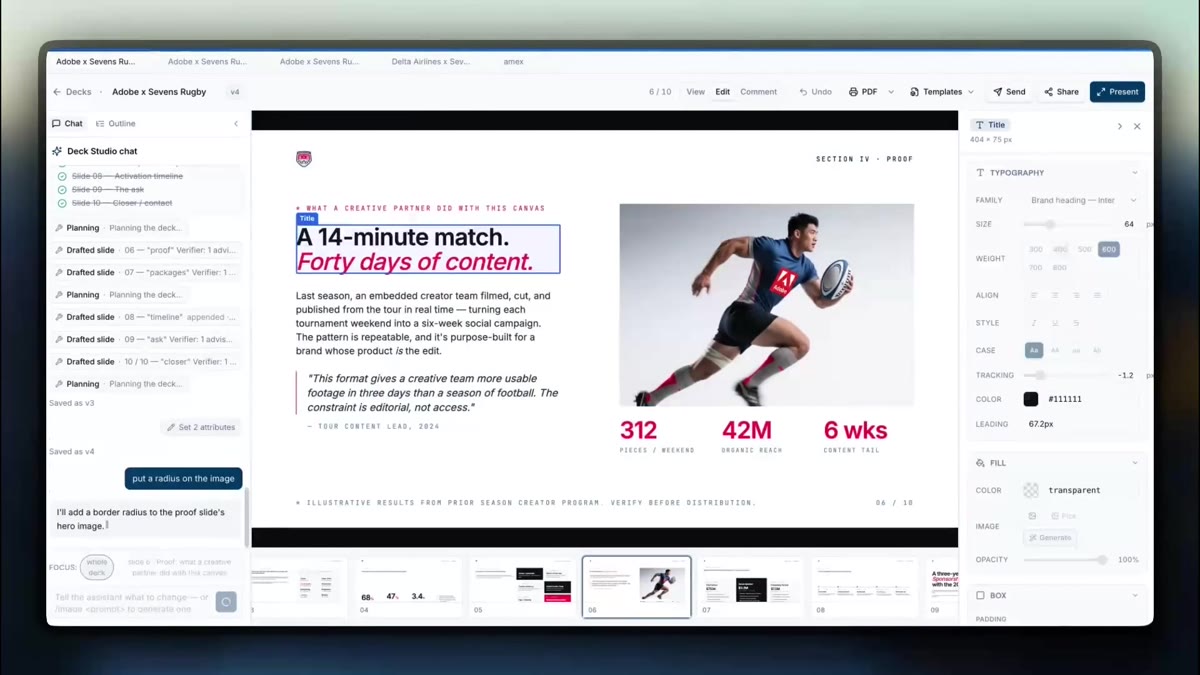
When you generate the Rivermen × bank deck, Deck Studio lays out named slides — not a blank theme. Partnership leads author the file; ops later attach proof. Last reviewed for this page: 20 September 2026.
- Cover — property mark left, prospect wordmark right, season year under the title.
- About — four short sentences: who you are, where you play, attendance you can defend, why this ask exists.
- Audience — demographics or ticket zips from data you paste; empty fields stay empty rather than inventing a national demo.
- Packages — titled rows with quantity, date window, and fee; each row maps to a fulfillable line.
- Mockup — the AI Mockups canvas with your jersey photo underneath and the bank logo locked to the sleeve region you selected.
- Price / next step — the ask total and one CTA (reply on-thread or book). No second “contact us” slide with a generic form.
Mockup editor labels (what you click)
- Upload asset — choose the home-kit still from your media library.
- Place logo — drop the bank SVG/PNG; drag the bounding box onto the sleeve panel.
- Lock region — keep collar and numbers clear so the mock reads as your kit, not a flat wrap.
- Insert into deck — the mockup slide references that render; changing the logo later updates the same slide.
Proof attach after a home date
Open the partner → Deliverables → the sleeve line → attach file. A phone JPEG from rinkside is enough for many lines. When you have tape, Clip detection finds the mark and attaches clip timestamps to that row. Suite nights get a guest list CSV or door photo on each allotment task. The brand can see attached proof in Brand HQ when you share it — deliverable evidence, not a Nielsen rating.
What this does not replace
League-scale broadcast measurement still exists for currency-grade ratings. Enterprise suites such as KORE still exist for multi-entity customization. Many teams keep a specialist and use SponsorFlo to author the pitch, mock the kit, and run fulfillment on one partner. Generic CRMs still exist for contacts that are not sponsorship deals — they are the wrong first surface for a jersey mockup.
Related pages
- AI mockups — logo on your jersey or board photo
- Brand ROI tracking — proof and exposure on the deliverable
- AI sponsorship automation — pitch through fulfillment in one workspace
- Sports sponsorship guide — packages, pricing, and season planning
- SponsorFlo vs KORE — when a suite is the wrong first buy